
useState 最小实现与原理深度解析
本文从零开始手动实现一个简化版的 useState,深入理解 React Hooks 的底层工作原理。
一、核心要点速览
💡 核心考点
- 链表存储:Hooks 状态以链表形式存储在 Fiber Node 中
- 索引追踪:通过
currentHookIndex按顺序访问每个 Hook - 批量更新:setState 将更新加入队列,合并为一次渲染
- 闭包陷阱:每次渲染捕获不同的状态快照
- 函数式更新:基于最新状态计算新值,避免异步问题
二、整体流程图
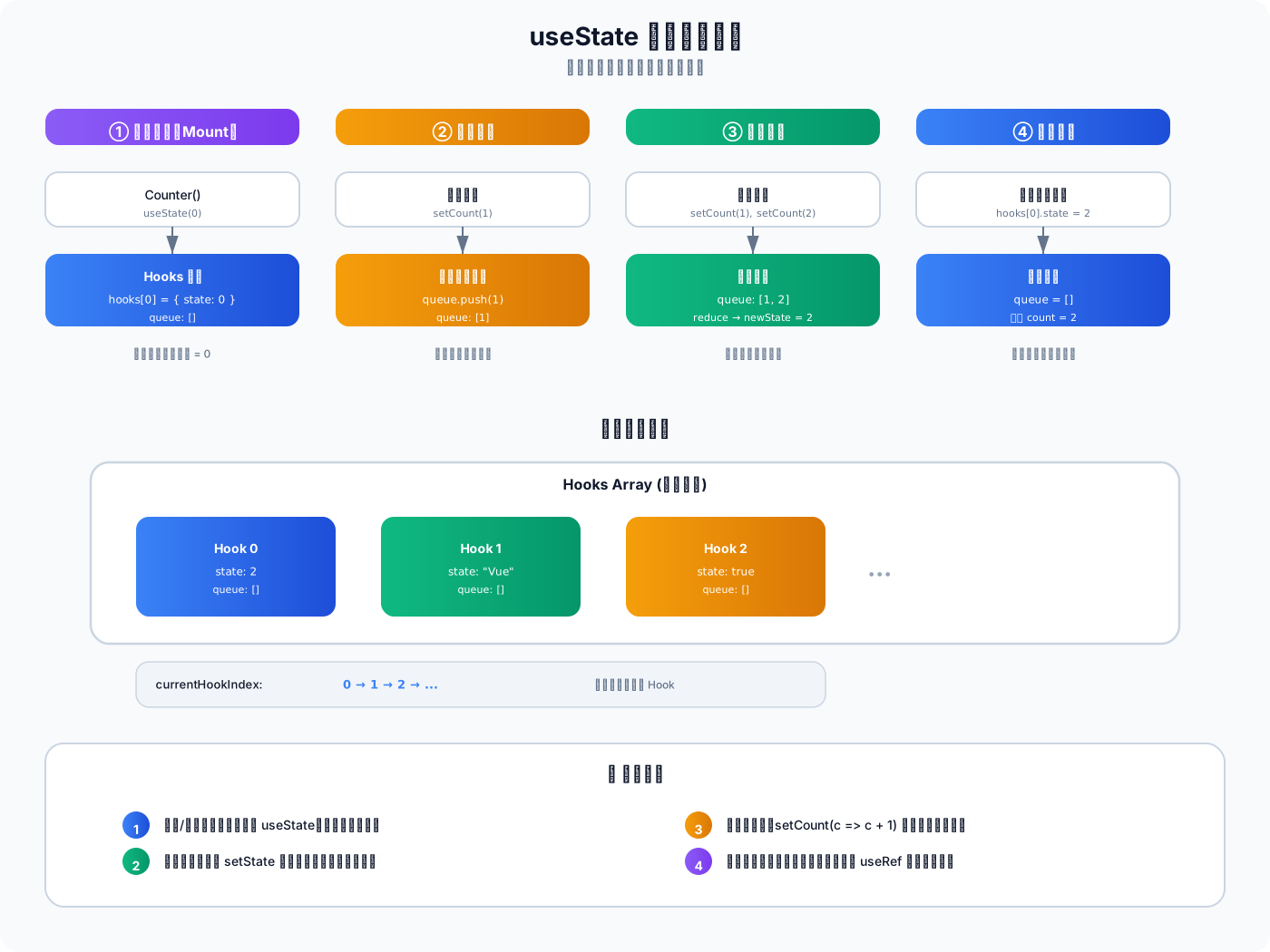
关键流程:
- 首次渲染:初始化 Hook 对象,存储初始状态
- 调用 setState:将更新加入队列,触发重新渲染
- 再次渲染:读取上次状态,处理队列中的更新
- 返回新状态:组件使用最新状态重新渲染
三、逐步实现 useState
版本 1:最简实现(单 Hook)
javascript
// ========== 全局变量 ==========
let state = null // 存储状态

// ========== useState 实现 ==========
function useState(initialValue) {
  // 首次渲染:初始化状态
  if (state === null) {
    state = initialValue
  }

  // setState 函数
  const setState = (newValue) => {
    state = newValue
    render() // 触发重新渲染
  }

  return [state, setState]
}

// ========== 模拟渲染 ==========
function Counter() {
  const [count, setCount] = useState(0)

  console.log('Current count:', count)

  return {
    type: 'button',
    props: {
      onClick: () => setCount(count + 1),
      children: `Count: ${count}`
    }
  }
}

// 测试
function render() {
  const element = Counter()
  console.log('Rendered:', element)
}

render() // Current count: 0
Counter().props.onClick() // 模拟点击
render() // Current count: 1问题:只能支持一个 useState,多个 Hook 会互相覆盖。
版本 2:支持多个 Hook(数组存储)
javascript
// ========== 全局变量 ==========
let hooks = []          // 存储所有 Hook 的状态
let currentHookIndex = 0 // 当前处理的 Hook 索引

// ========== useState 实现 ==========
function useState(initialValue) {
  const hookIndex = currentHookIndex

  // 首次渲染:初始化状态
  if (hooks[hookIndex] === undefined) {
    hooks[hookIndex] = {
      state: initialValue,
      queue: [] // 待处理更新队列
    }
  }

  const hook = hooks[hookIndex]

  // setState 函数
  const setState = (newValue) => {
    // 将更新加入队列
    hook.queue.push(newValue)

    // 触发重新渲染
    scheduleUpdate()
  }

  // 移动到下一个 Hook
  currentHookIndex++

  return [hook.state, setState]
}

// ========== 模拟渲染 ==========
let isRendering = false

function scheduleUpdate() {
  // 避免在渲染过程中触发新的渲染
  if (!isRendering) {
    Promise.resolve().then(() => {
      render()
    })
  }
}

function render(Component) {
  isRendering = true

  // 重置索引
  currentHookIndex = 0

  // 处理队列中的更新
  hooks.forEach((hook, index) => {
    if (hook.queue.length > 0) {
      // 依次应用所有更新
      let newState = hook.queue.reduce((state, action) => {
        return typeof action === 'function' ? action(state) : action
      }, hook.state)

      hook.state = newState
      hook.queue = [] // 清空队列
    }
  })

  // 执行组件
  const element = Component()

  isRendering = false
  return element
}

// ========== 使用示例 ==========
function Counter() {
  const [count, setCount] = useState(0)
  const [name, setName] = useState('Vue')

  console.log(`Count: ${count}, Name: ${name}`)

  return {
    type: 'div',
    props: {
      children: [
        { type: 'p', props: { children: `Count: ${count}` } },
        { type: 'p', props: { children: `Name: ${name}` } },
        {
          type: 'button',
          props: {
            onClick: () => setCount(c => c + 1),
            children: 'Increment'
          }
        },
        {
          type: 'button',
          props: {
            onClick: () => setName('React'),
            children: 'Change Name'
          }
        }
      ]
    }
  }
}

// 测试
render(Counter) // Count: 0, Name: Vue

// 模拟点击 Increment
const element = render(Counter)
element.props.children[2].props.onClick() // setCount(c => c + 1)

Promise.resolve().then(() => {
  render(Counter) // Count: 1, Name: Vue
})改进:
- ✅ 支持多个 useState
- ✅ 使用数组存储 Hook 状态
- ✅ 支持函数式更新
版本 3:完整实现(区分挂载/更新阶段)
javascript
// ========== 核心数据结构 ==========

// Hook 对象结构
let hooks = []           // 存储所有 Hook 的状态
let currentHookIndex = 0 // 当前处理的 Hook 索引
let isMounting = true    // 区分挂载/更新阶段

// ========== 简化版 useState 实现 ==========

function myUseState(initialValue) {
  const hookIndex = currentHookIndex

  if (isMounting) {
    // 首次渲染:初始化状态
    hooks[hookIndex] = {
      state: initialValue,
      queue: [] // 待处理更新队列
    }
  } else {
    // 更新渲染:读取上次的状态
    const lastState = hooks[hookIndex].state

    // 处理队列中的更新(批量更新)
    const queue = hooks[hookIndex].queue
    if (queue.length > 0) {
      // 依次应用所有更新
      let newState = queue.reduce((state, action) => {
        return typeof action === 'function' ? action(state) : action
      }, lastState)

      hooks[hookIndex].state = newState
      hooks[hookIndex].queue = [] // 清空队列
    }
  }

  // setState 函数
  const setState = (newValue) => {
    // 将更新加入队列
    hooks[hookIndex].queue.push(newValue)

    // 触发重新渲染(简化版,实际使用 React 的调度器)
    scheduleUpdate()
  }

  // 移动到下一个 Hook
  currentHookIndex++

  return [hooks[hookIndex].state, setState]
}

// ========== 模拟组件渲染 ==========

let componentState = null
let currentComponent = null

function render(Component) {
  // 重置全局状态
  hooks = []
  currentHookIndex = 0
  isMounting = true

  // 保存当前组件
  currentComponent = Component

  // 首次渲染
  componentState = Component()

  // 标记为已挂载
  isMounting = false
}

function scheduleUpdate() {
  // 异步触发重新渲染(模拟 React 的批处理)
  Promise.resolve().then(() => {
    // 更新阶段:不重置 hooks 数组
    currentHookIndex = 0
    isMounting = false

    // 重新渲染
    componentState = currentComponent()
  })
}

// ========== 使用示例 ==========

function Counter() {
  const [count, setCount] = myUseState(0)

  console.log('Current count:', count)

  return {
    type: 'button',
    props: {
      onClick: () => setCount(count + 1),
      children: `Count: ${count}`
    }
  }
}

// 测试
render(Counter)
// 输出: Current count: 0

// 模拟点击按钮
const button = componentState
button.props.onClick() // setCount(1)

Promise.resolve().then(() => {
  // 输出: Current count: 1
})核心改进:
- ✅ 区分挂载和更新阶段
- ✅ 挂载时初始化,更新时读取状态
- ✅ 批量处理队列中的更新
版本 4:生产级实现(环形队列 + 优先级)
javascript
// ========== 更新对象结构 ==========

class Update {
  constructor(payload, priority = 0) {
    this.payload = payload  // 更新内容(新值或函数)
    this.priority = priority // 优先级
    this.next = null        // 链表指针
  }
}

// ========== 更新队列 ==========

class UpdateQueue {
  constructor() {
    this.pending = null // 环形链表的最后一个节点
  }
}

// ========== 创建更新 ==========

function createUpdate(payload, priority = 0) {
  return new Update(payload, priority)
}

// ========== 入队操作 ==========

function enqueueUpdate(hook, update) {
  const queue = hook.queue

  if (queue.pending === null) {
    // 队列为空,形成环
    update.next = update
  } else {
    // 插入到环的末尾
    update.next = queue.pending.next
    queue.pending.next = update
  }

  queue.pending = update
}

// ========== 处理更新队列 ==========

function processUpdateQueue(hook) {
  const queue = hook.queue
  const pending = queue.pending

  if (pending === null) return hook.state

  // 解开环形链表
  const firstUpdate = pending.next
  pending.next = null

  let update = firstUpdate
  let newState = hook.state

  // 按优先级排序并应用更新
  const updates = []
  while (update !== null) {
    updates.push(update)
    update = update.next
  }

  // 按优先级排序(高优先级先执行)
  updates.sort((a, b) => a.priority - b.priority)

  // 依次应用更新
  updates.forEach(update => {
    const payload = update.payload
    newState = typeof payload === 'function'
      ? payload(newState)
      : payload
  })

  return newState
}

// ========== 完整 useState 实现 ==========

let hooks = []
let currentHookIndex = 0
let isMounting = true

function useState(initialValue) {
  const hookIndex = currentHookIndex

  if (isMounting) {
    // 首次渲染:初始化
    hooks[hookIndex] = {
      state: initialValue,
      queue: new UpdateQueue()
    }
  } else {
    // 更新渲染:处理队列
    const hook = hooks[hookIndex]
    hook.state = processUpdateQueue(hook)
  }

  const hook = hooks[hookIndex]

  // setState 函数
  const setState = (action, priority = 0) => {
    const update = createUpdate(action, priority)
    enqueueUpdate(hook, update)

    // 调度更新
    scheduleUpdate()
  }

  currentHookIndex++
  return [hook.state, setState]
}

// ========== 调度器 ==========

let isRendering = false
let currentComponent = null

function scheduleUpdate() {
  if (!isRendering) {
    Promise.resolve().then(() => {
      render(currentComponent)
    })
  }
}

function render(Component) {
  isRendering = true

  // 重置索引
  currentHookIndex = 0

  // 执行组件
  const element = Component()

  isRendering = false
  return element
}

// ========== 使用示例 ==========

function Counter() {
  const [count, setCount] = useState(0)

  console.log('Count:', count)

  return {
    type: 'div',
    props: {
      children: [
        { type: 'p', props: { children: count } },
        {
          type: 'button',
          props: {
            onClick: () => {
              // 同步更新(高优先级)
              setCount(c => c + 1, 1)
              setCount(c => c + 1, 1)
              setCount(c => c + 1, 1)
            },
            children: '+3 (Sync)'
          }
        },
        {
          type: 'button',
          props: {
            onClick: () => {
              // 异步更新(低优先级)
              setTimeout(() => {
                setCount(c => c + 10, 0)
              }, 1000)
            },
            children: '+10 (Async)'
          }
        }
      ]
    }
  }
}

// 测试
currentComponent = Counter
render(Counter) // Count: 0

// 模拟点击 +3 按钮
const element = render(Counter)
element.props.children[1].props.onClick()

Promise.resolve().then(() => {
  render(Counter) // Count: 3
})生产级特性:
- ✅ 环形队列结构(高效入队)
- ✅ 优先级调度(紧急更新优先)
- ✅ 批量更新合并
- ✅ 函数式更新支持
四、关键原理分析
1. 为什么需要链表/数组存储?
javascript
// ❌ 错误:单个变量无法支持多个 Hook
let state = null

function Component() {
  const [count, setCount] = useState(0)    // state = 0
  const [name, setName] = useState('Vue')  // state = 'Vue'(覆盖了 count!)
}

// ✅ 正确:数组/链表存储
let hooks = []

function Component() {
  const [count, setCount] = useState(0)    // hooks[0] = { state: 0 }
  const [name, setName] = useState('Vue')  // hooks[1] = { state: 'Vue' }
}原因:
- 组件可能调用多次 useState
- 每次调用需要独立的状态存储
- 必须按顺序对应,不能混乱
2. 为什么必须在顶层调用?
javascript
// ❌ 错误:条件调用导致索引错乱
function Component({ condition }) {
  if (condition) {
    const [count, setCount] = useState(0)  // 第1次渲染:hooks[0]
  }
  const [name, setName] = useState('Vue')  // 第1次渲染:hooks[1]
}

// 第1次渲染:condition = true
// hooks = [{ state: 0 }, { state: 'Vue' }]

// 第2次渲染:condition = false
// hooks = [{ state: 'Vue' }] ← 索引错位!name 读取了 count 的位置后果:
- Hook 索引不匹配
- 状态读取错误
- 可能导致崩溃
3. 批量更新的实现原理
javascript
// 场景:连续调用三次 setState
function handleClick() {
  setCount(1)
  setCount(2)
  setCount(3)
}

// 内部流程:
// 1. setCount(1) → queue = [1]
// 2. setCount(2) → queue = [1, 2]
// 3. setCount(3) → queue = [1, 2, 3]
// 4. 触发重新渲染
// 5. 处理队列:reduce((state, action) => action, 0)
//    - state = 0, action = 1 → newState = 1
//    - state = 1, action = 2 → newState = 2
//    - state = 2, action = 3 → newState = 3
// 6. 最终结果:count = 3优势:
- 多次更新合并为一次渲染
- 提升性能
- 保证状态一致性
4. 函数式更新 vs 直接更新
javascript
// ❌ 直接更新:基于闭包中的旧值
const handleClick = () => {
  setCount(count + 1)  // count 是渲染时的快照
  setCount(count + 1)  // 还是同一个快照
  setCount(count + 1)  // 结果:count + 1(不是 +3)
}

// ✅ 函数式更新:基于最新状态
const handleClick = () => {
  setCount(c => c + 1)  // c = 0 → 1
  setCount(c => c + 1)  // c = 1 → 2
  setCount(c => c + 1)  // c = 2 → 3
  // 结果:count + 3
}原理:
- 直接更新:捕获渲染时的
count值(闭包) - 函数式更新:接收最新状态作为参数
五、常见问题与解决方案
Q1: 如何解决闭包陷阱?
三种方案:
javascript
// 方案 1: 函数式更新(推荐)
useEffect(() => {
  const id = setInterval(() => {
    setCount(c => c + 1)  // 始终获取最新值
  }, 1000)
  return () => clearInterval(id)
}, [])

// 方案 2: 添加依赖(重建 effect)
useEffect(() => {
  const id = setInterval(() => {
    setCount(count + 1)  // count 是最新的
  }, 1000)
  return () => clearInterval(id)
}, [count])  // count 变化时重建定时器

// 方案 3: useRef 保存可变值
const countRef = useRef(count)
useEffect(() => {
  countRef.current = count
}, [count])

useEffect(() => {
  const id = setInterval(() => {
    console.log(countRef.current)  // 通过 ref 访问最新值
  }, 1000)
  return () => clearInterval(id)
}, [])Q2: useState 和 class setState 的区别?
| 对比项 | useState | class setState |
|---|---|---|
| 合并策略 | 不合并,直接替换 | 浅合并对象 |
| 更新时机 | 异步批处理 | 异步批处理 |
| 获取最新值 | 函数式更新 prev => newValue | 回调函数 (state, props) => newState |
| 拆分状态 | 需要多个 useState | 单个 state 对象 |
javascript
// useState: 完全替换
const [form, setForm] = useState({ name: '', age: 0 })
setForm({ name: 'new' })  // age 丢失!

// 正确做法
setForm(prev => ({ ...prev, name: 'new' }))

// class setState: 自动合并
this.setState({ name: 'new' }) // age 保留Q3: 惰性初始化的作用是什么?
javascript
// ❌ 浪费性能:每次渲染都计算
const [data, setData] = useState(expensiveComputation())

// ✅ 优化性能:仅首次计算
const [data, setData] = useState(() => {
  return expensiveComputation()  // 只在 mount 时执行
})

// 适用场景:
// - 复杂计算
// - 从 localStorage 读取
// - 解析大型 JSONQ4: 如何批量更新多个 useState?
javascript
function handleClick() {
  // React 18 自动批处理
  setName('Alice')
  setAge(25)
  setEmail('[email protected]')
  // 只触发一次重新渲染

  // 异步操作中需要手动批处理(React 17 及更早版本)
  setTimeout(() => {
    ReactDOM.unstable_batchedUpdates(() => {
      setName('Bob')
      setAge(30)
    })
  }, 1000)
}六、记忆口诀
useState 核心要点:

Hooks 数组存状态,索引追踪按序排。
挂载初始化状态,更新读取旧快照。
setState 进队列,批量更新再渲染。
闭包捕获旧数值,函数更新拿最新。
条件调用是大忌,索引错位必出错。
惰性初始化优化,复杂计算只一次。七、总结一句话
- 核心原理:数组存储 + 索引追踪 + 批量更新 = 简洁高效的状态管理 🎯
- 最佳实践:函数式更新 + 惰性初始化 + 合理拆分 = 避免常见陷阱 ✓
- 面试要点:链表结构 + 闭包陷阱 + 批量更新 = 高频考点 ⚡